Minimal Clock
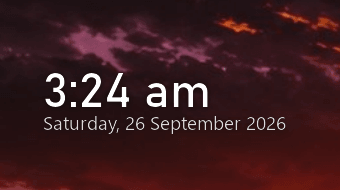
Two lines of text on the wallpaper. No window, no panel, no box.
A desktop clock that paints nothing but its own letters. The time and the date sit on your wallpaper, and every pixel the widget does not draw is your actual desktop — so anything moving behind it keeps moving.
What it is
Minimal Clock, in detail.
Two lines of text on the wallpaper. No window, no panel, no box.
Desktop clocks usually arrive as a widget panel, and a panel is something you have to look past: a rectangle sitting on top of the wallpaper, or a frosted card pretending not to be there.
This one is only the text. It is not a transparent window either — that was the first two attempts, and both were abandoned for the reason you can guess: a browser window composites its own output, so every pixel of it stays painted whatever colour is keyed out. The face is drawn by the application and handed to Windows as a layered window with per-pixel alpha, which is the only way the pixels the widget does not paint can genuinely be the desktop.
The visible result is two lines of type — the time and the date — in the size and colour you choose, dragged anywhere, resized from the corner, and left sitting on the wallpaper when you press Win+D.
What it does
The desktop stays the desktop
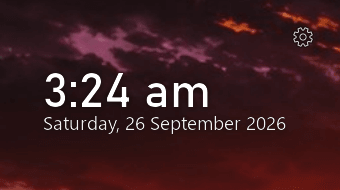
Anything moving behind the widget keeps moving — a video, an animated wallpaper, a window sliding past. Nothing is captured, frozen or copied, because there is no surface to copy into.
Time and date, sized to taste
Drag the text to move it and the bottom-right corner to resize it; the type scales with the width, so it reads the same at 200px wide or a third of the screen.
Ink that suits the wallpaper
White ink for dark backgrounds, near-black for light ones, with a soft halo under both so the time stays readable over a photograph instead of disappearing into it.
Hover, or right-click, for the menu
A gear fades in over the text when the pointer is near it. The menu holds five switches — 24-hour, always on top, stay on the desktop, draggable, start with Windows — then fit to text, open the folder, quit.
Stay on the desktop is the point
Showing the desktop leaves the clock on the wallpaper rather than minimising it, and dismissing the desktop hands the front back instead of leaving the clock floating over your work.
Settings you can read
Position, size, ink and every switch live in config.json beside the widget — plain text, no registry, no hidden state.
Built with
- Python 3
- Pillow
- Win32 layered windows (UpdateLayeredWindow)
- pystray
- Bahnschrift + Segoe UI
- Nothing but the text
- Your wallpaper shows through
- Survives Win+D
- 12 or 24 hour, light or dark ink
Worth knowing
- Windows only, and specifically Windows' layered-window API. This one cannot be ported by recompiling.
- It runs from source: Python, then run.cmd. There is no packaged installer yet.
- MIT licensed, so the code is yours to reuse, change and ship.
- No network calls, no account, no telemetry. The only file it writes is its own config.json.
- Dragging the text uses Windows' own caption drag, which is why it stays smooth — but it also means the window has no frame to grab anywhere else.
Where it goes next
- A packaged build, so Python is not a prerequisite.
- Placement per monitor, and a second time zone for people who work across two.
Screenshots on this page are captures of the running application, not mock-ups.
Put it on the wallpaper
Minimal Clock is free, open source, and finished enough to use.
Download it, run run.cmd, and drag the text where you want it. There is nothing to configure before it works, and no window to close when you are done with it.