Simple Notes
A sticky note on the desktop that behaves like one.
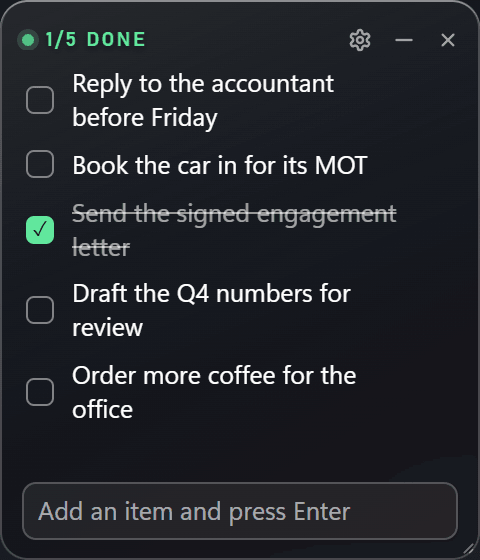
An always-on-top Windows note with a checklist. Click a line to tick it and it strikes through, type and press Enter to add another, and the whole note is saved beside the widget so it is exactly as you left it tomorrow.
What it is
Simple Notes, in detail.
A sticky note on the desktop that behaves like one.
Most note apps are places you have to go. This one sits on the desktop, in the corner you already look at, and holds the handful of things that would otherwise be written on a paper square stuck to the monitor.
It is a checklist rather than a text box: click a line to tick it, click again to undo, and a finished line dims as it goes. The note survives a restart, keeps its position and its size, and because it is pinned to the desktop rather than floating above your work, pressing Win+D leaves it sitting on the wallpaper instead of hiding it.
There is no account, no sync and no network code at all. The note is a single local file you can read, copy or throw away.
What it does
Tick a line, it strikes through
Clicking an item crosses it out and dims it, and clicking it again brings it back. The only colour in the note is the mint tick on a finished line, which is the one piece of state worth seeing from across the room.
Type, press Enter, done
New items are added from the field at the bottom. A small × appears on hover when you want a line gone. Long text wraps rather than being cut off.
Moves and resizes like a window
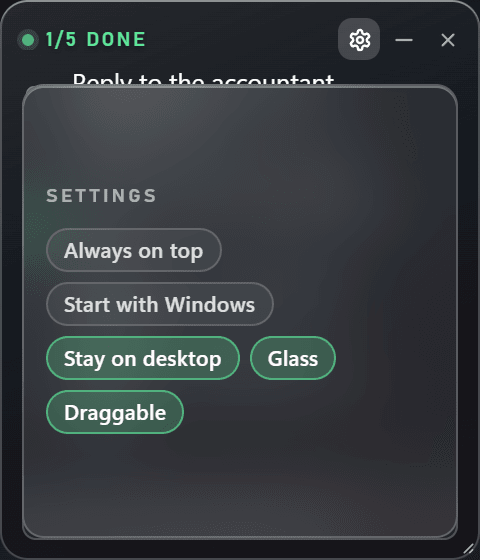
Drag the header strip to move it, drag the bottom-right corner to resize it, and everything inside reflows. A lock in the settings sheet freezes both while leaving the checklist usable, so a parked note is still a working note.
Stays on the desktop
Show the desktop — Win+D, or the strip at the end of the taskbar — and the note stays on the wallpaper rather than minimising. Dismiss the desktop and it goes back behind your windows instead of on top of them.
Saved locally, loaded on start
Items live in notes.json beside the widget, written atomically so an interrupted save cannot eat the file. Copy it to another machine and the note travels with it.
A tray menu, not a settings hunt
New item, show or hide, always on top, start with Windows, stay on the desktop, draggable, quit. The tray tooltip reads how many items are done — n of m — so the note can stay hidden and still tell you something.
Built with
- Python 3
- pywebview 6 (Edge WebView2)
- pystray
- Pillow
- A checklist that ticks off
- Stays on the desktop through Win+D
- Drag to move, corner to resize
- One local file, no account
Worth knowing
- Windows only. There is no macOS or Linux build.
- No installer yet: it runs from source, so the download needs Python and a double-click on run.cmd.
- MIT licensed, so the code is yours to reuse, change and ship.
- Everything is local. The note is one JSON file next to the widget and the app makes no network calls.
- Caps, so the widget stays a note and not a database: 200 items, 400 characters per item.
Where it goes next
- A packaged build, so Python is not a prerequisite.
- A second note, for people who want the list to be two lists.
Screenshots on this page are captures of the running application, not mock-ups.
Pin it to the corner
Simple Notes is free, open source, and finished enough to use.
Download it, run run.cmd, and put the things you keep forgetting where you already look. It is a few hundred lines of Python and one local file — nothing else is involved.